No Scrollbar for Model Selection When Site is Zoomed In
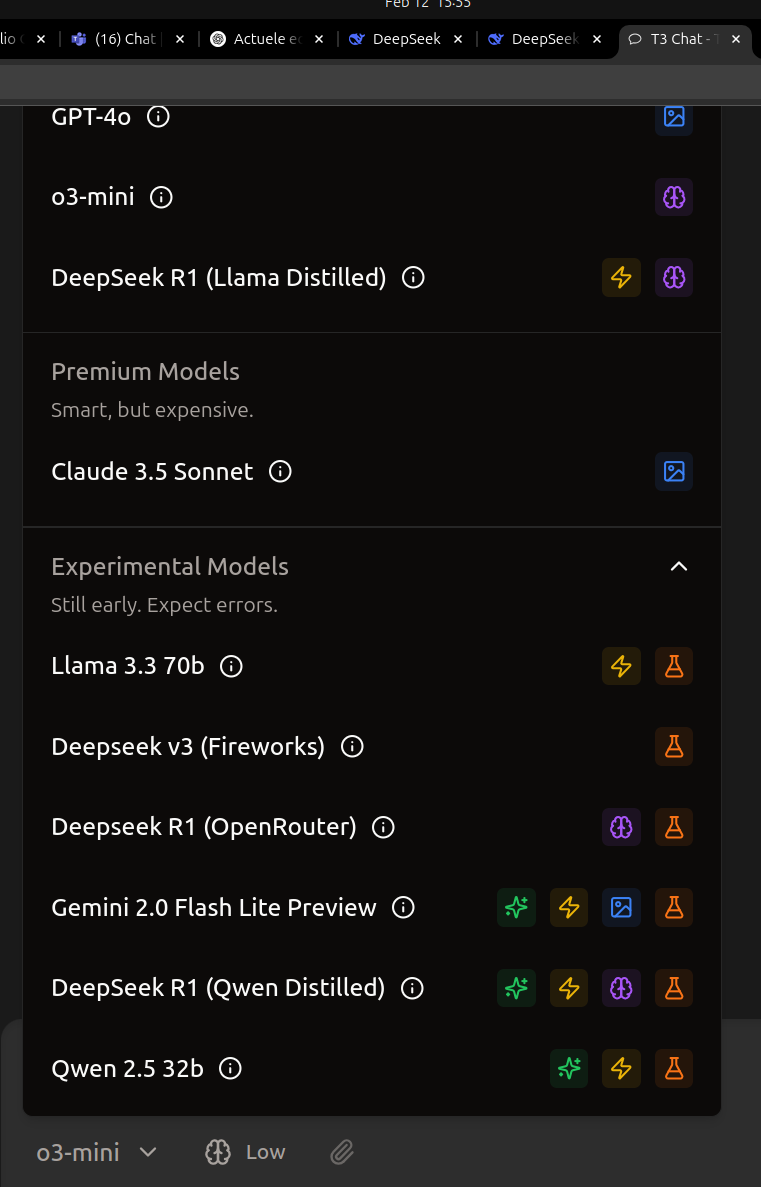
When zooming in on the entire website, the model selection list overflows beyond the visible area, but no scrollbar appears to navigate through the hidden models. This makes it difficult to view or select models without adjusting the zoom level back down, which is inconvenient for users who prefer higher zoom for readability.
Steps to Reproduce:
Open the website and navigate to the model selection interface.
Zoom in on the entire site using
Ctrl++(or equivalent browser zoom function).Observe that the model list extends beyond the screen without a scrollbar to navigate through the overflow.
Expected Behavior:
When the model list overflows due to zooming, a scrollbar should appear, allowing users to scroll and access all models.
Actual Behavior:
The model list overflows beyond the visible area with no scrollbar, making it impossible to access hidden models unless the zoom level is reduced.
Environment:
Browser: Chrome 132.0.6834.110 (Official Build) (64-bit)
Screenshot:
Suggested Fixes:
Add a scrollbar to the model selection list when content overflows.
Consider making the model selection container responsive to zoom changes, or implement a dynamic layout that adjusts model grouping/display accordingly.
Please authenticate to join the conversation.
Completed
Bug Reports
Subscribe to post
Get notified by email when there are changes.
Completed
Bug Reports
Subscribe to post
Get notified by email when there are changes.