BUG REPORT: Blocked requests should stop response generation
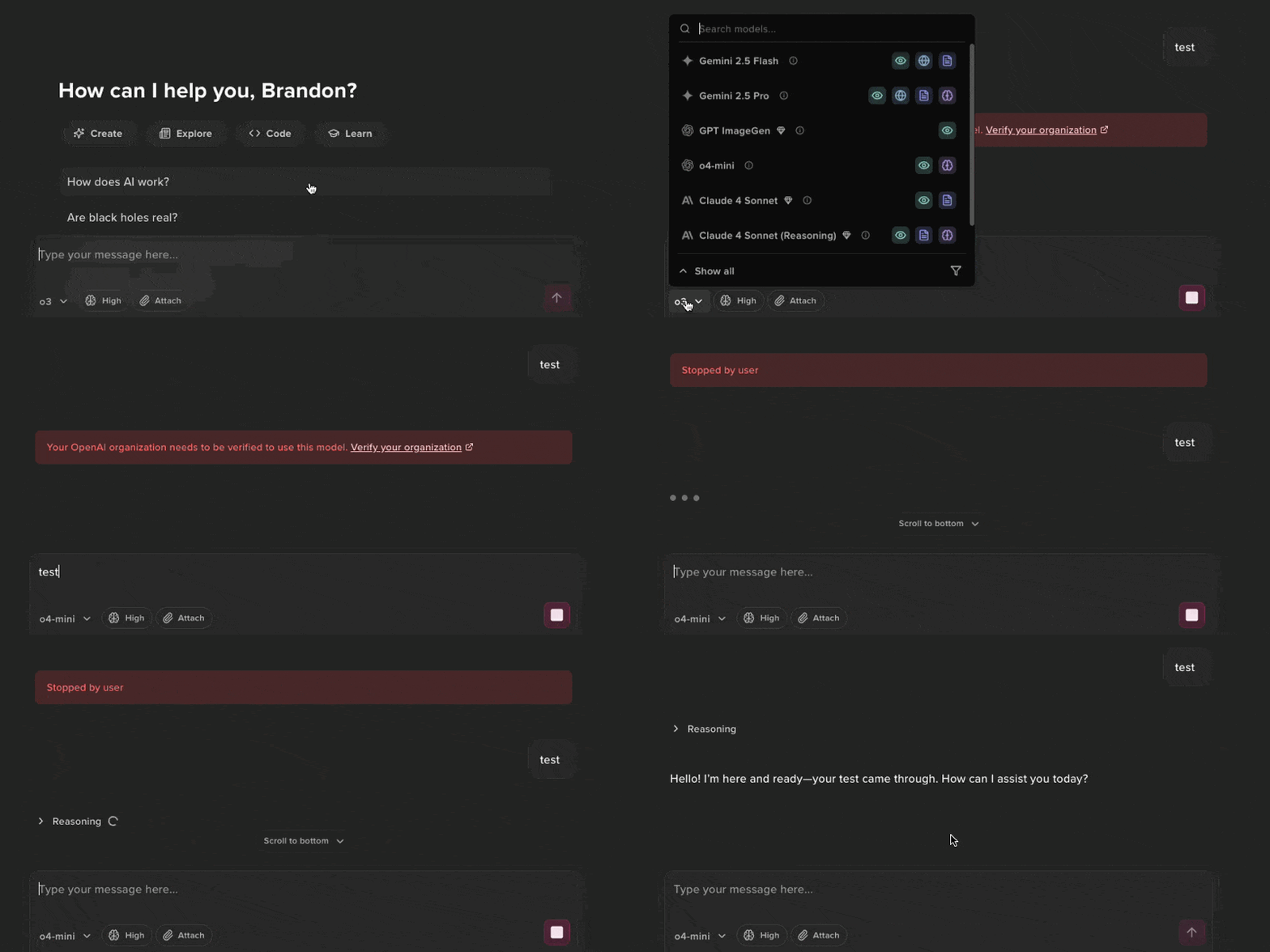
Blocked requests don't automatically stop response generation, blocking additional requests unless you manually click stop, even after changing models.
To reproduce this:
Set up an OpenAI key under API Keys in Settings that requires organization verification. **This organization should not be verified yet, for proper reproduction.
Start a new chat.
Select a model that DOES require organization verification, like o3.
Type a message and click Enter on your keyboard.
You should see this error: “Your OpenAI organization needs to be verified to use this model. Verify your organization”
Select a model that DOES NOT require organization verification, like o4-mini.
Type a message and click Enter on your keyboard.
🚨 NOTHING HAPPENS
To work around this issue when it occurs (after previous step 8):
Manually click the Stop button with your mouse.
Then, manually click the Submit button with your mouse or click Enter again.
Please authenticate to join the conversation.
Completed
Bug Reports
Subscribe to post
Get notified by email when there are changes.
Completed
Bug Reports
Subscribe to post
Get notified by email when there are changes.